# Optifine

{% hint style="info" %}
此模组加载器已考虑对其支持自动安装功能。
{% endhint %}

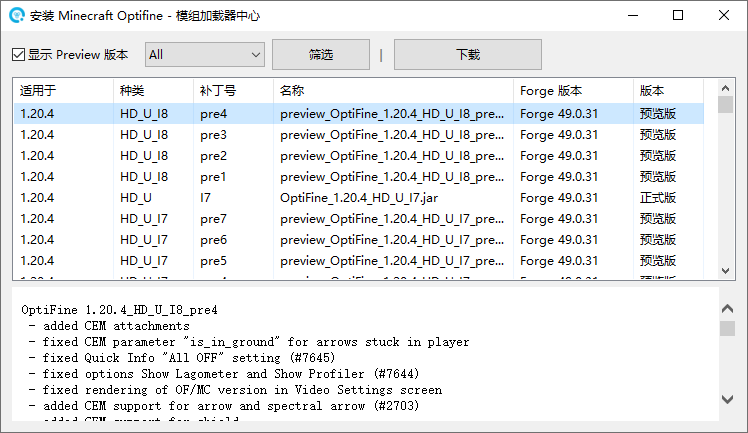
1. 通过使用《[模组加载器中心](https://docs.nullcraft.org/software/modloader-center)》下载或[自行下载](https://optifine.net/downloads) Optifine Installer(安装器) 文件

<figure><img src="/files/Wl8oW2rsYuWxFY0WvjVN" alt=""><figcaption></figcaption></figure>

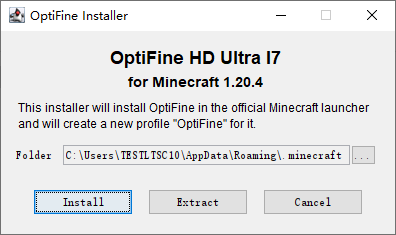
2. 选择游戏版本后，指定安装位置(.minecraft文件夹)即可安装

<figure><img src="/files/ETrzDCwNyfPUHQLdhQlc" alt=""><figcaption></figcaption></figure>


---

# Agent Instructions: Querying This Documentation

If you need additional information that is not directly available in this page, you can query the documentation dynamically by asking a question.

Perform an HTTP GET request on the current page URL with the `ask` query parameter:

```
GET https://docs.nullcraft.org/tutorial/install-modloader/minecraft/optifine.md?ask=<question>
```

The question should be specific, self-contained, and written in natural language.
The response will contain a direct answer to the question and relevant excerpts and sources from the documentation.

Use this mechanism when the answer is not explicitly present in the current page, you need clarification or additional context, or you want to retrieve related documentation sections.