> For the complete documentation index, see [llms.txt](https://docs.nullcraft.org/llms.txt). Markdown versions of documentation pages are available by appending `.md` to page URLs; this page is available as [Markdown](https://docs.nullcraft.org/tutorial/install-modloader/minecraft/fabric.md).
# Fabric
Minecraft Fabric
{% hint style="info" %}
此模组加载器已考虑对其支持自动安装功能。
{% endhint %}
### 安装服务端
1. 通过使用《[模组加载器中心](/software/modloader-center.md)》下载或[自行下载](https://fabricmc.net/use/server/) Fabric Minecraft Server Launcher(服务端启动器) 文件
 {% hint style="info" %}
如果使用《[模组加载器中心](/software/modloader-center.md)》下载服务端后,将会弹出使用教学
{% endhint %}
{% hint style="info" %}
如果使用《[模组加载器中心](/software/modloader-center.md)》下载服务端后,将会弹出使用教学
{% endhint %}
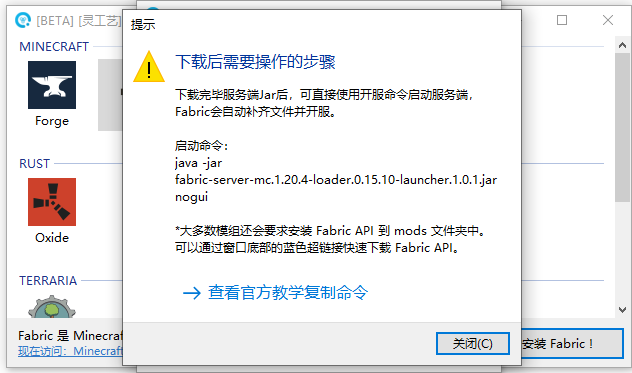 3. 通过使用《[我的世界开服器](/software/minecraft-server.md)》或 Bash 命令行/脚本启动服务端
```bash
// 启动命令行
java 可选参数 -jar 服务端启动器.jar nogui
// 完整实例
java -Xmx2G -jar fabric-server-mc.1.20.4-loader.0.15.10-launcher.1.0.1.jar nogui
```
### 安装客户端
1. 通过使用《[模组加载器中心](/software/modloader-center.md)》下载或[自行下载](https://fabricmc.net/use/installer/) Fabric Installer(安装器) 文件
2. 运行下载的 Fabric Installer 文件
3. 通过使用《[我的世界开服器](/software/minecraft-server.md)》或 Bash 命令行/脚本启动服务端
```bash
// 启动命令行
java 可选参数 -jar 服务端启动器.jar nogui
// 完整实例
java -Xmx2G -jar fabric-server-mc.1.20.4-loader.0.15.10-launcher.1.0.1.jar nogui
```
### 安装客户端
1. 通过使用《[模组加载器中心](/software/modloader-center.md)》下载或[自行下载](https://fabricmc.net/use/installer/) Fabric Installer(安装器) 文件
2. 运行下载的 Fabric Installer 文件
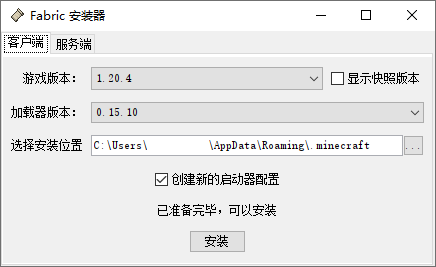 3. 选择游戏版本后,指定安装位置(.minecraft文件夹)即可安装
{% hint style="info" %}
Fabric 官方推荐使用此文档上方的 [#an-zhuang-fu-wu-duan](#an-zhuang-fu-wu-duan "mention") 进行安装使用。
{% endhint %}
3. 选择游戏版本后,指定安装位置(.minecraft文件夹)即可安装
{% hint style="info" %}
Fabric 官方推荐使用此文档上方的 [#an-zhuang-fu-wu-duan](#an-zhuang-fu-wu-duan "mention") 进行安装使用。
{% endhint %}