> For the complete documentation index, see [llms.txt](https://docs.nullcraft.org/llms.txt). Markdown versions of documentation pages are available by appending `.md` to page URLs; this page is available as [Markdown](https://docs.nullcraft.org/software/minecraft-server/custom-features.md).
# 自定义功能
Custom features
## 自定义快捷指令
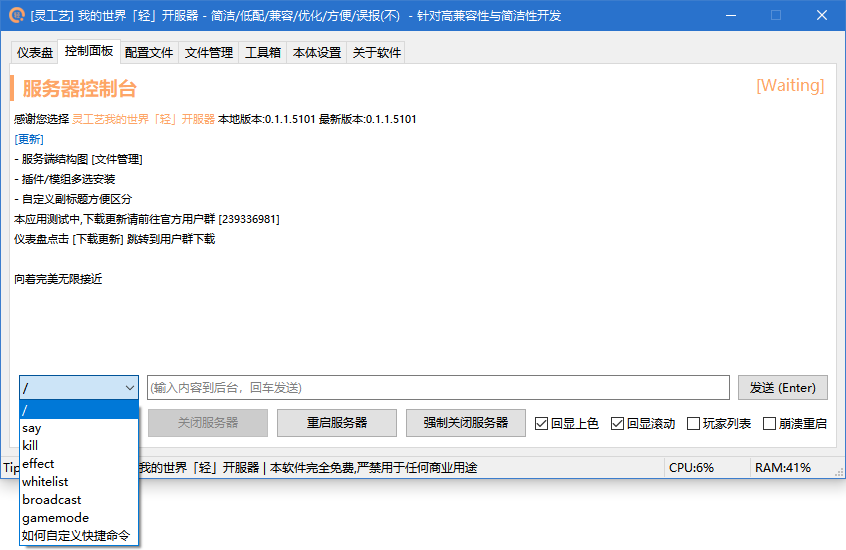
如图所示,这里面的快捷命令不一定就是你需要的,那么如何去自定义它呢?
 ### **添加自定义指令**
**步骤如下**
1. 打开开服器所在文件夹下的 **`config.ini`**
2. 在文件最后一行回车,并添加 **`[Custom]`** 为独立一行
3. 再次回车开启新的一行并添加命令 **`Command=`**
4. 在 **`Command=`** 等号后面输入你要添加的命令 **但是有以下要求!**
1. 开头必须由 **`/`** 开头
2. 每个命令中间使用 **`;`** 分割
### 如需取消自定义快捷命令
**删除** **`Command=XXX`** **一行即可**
### 文件示例
## 强制设置服务端状态
如果已确定服务端运行但开服器未正常读取到运行状态,可使用以下命令强制更新服务端状态
```
/nc serverisruning
```
{% hint style="warning" %}
为了保证服务端确实已运行,命令采用发送say命令判断服务端是否运行
{% endhint %}
### **添加自定义指令**
**步骤如下**
1. 打开开服器所在文件夹下的 **`config.ini`**
2. 在文件最后一行回车,并添加 **`[Custom]`** 为独立一行
3. 再次回车开启新的一行并添加命令 **`Command=`**
4. 在 **`Command=`** 等号后面输入你要添加的命令 **但是有以下要求!**
1. 开头必须由 **`/`** 开头
2. 每个命令中间使用 **`;`** 分割
### 如需取消自定义快捷命令
**删除** **`Command=XXX`** **一行即可**
### 文件示例
## 强制设置服务端状态
如果已确定服务端运行但开服器未正常读取到运行状态,可使用以下命令强制更新服务端状态
```
/nc serverisruning
```
{% hint style="warning" %}
为了保证服务端确实已运行,命令采用发送say命令判断服务端是否运行
{% endhint %}
